
Who uses it
- Your teamRuns the panel in the browser
- ResellersThe same panel, filtered by their role
- Your customersTheir own portal, with only their own apps
- Your AI toolsConnect through MCP. Admin access stays off until you add an admin key.
- VisitorsOpen the apps you make public
Front door
- TraefikHTTPS certificates from Let's Encrypt
- At least one web address per app
- New apps start private, behind the panel sign-in
The panel One service, written in Go, with a React web app
- Your first day: 2Web appViews for your team, resellers and customers. Setup wizard in seven languages.
- REST API and MCP262 documented API operations. MCP: 28 tools for your team and 10 for customers. API keys and an audit log.
- Built-in AIAn assistant that asks before it changes anything. AI Deploy proposes how to run a repository. Insights show what needs attention.
Needs an AI provider set up in the panel.
- AutofixHandles a set of supported problems. You switch each action on or off and see what it did.
- Your first day: 5Background jobsBuild apps and back up supported databases and volumes. They also watch health, meter AI use per customer key, apply the updates you start and rotate supported secrets.
Services installed with the panel
- KeycloakSign-in, two-factor authentication and single sign-on
- PostgreSQLPanel data and the job queue
- ValkeyIn-memory store
- OpenBaoSecrets, encrypted in separate compartments for the platform and each customer
- LiteLLMAI gateway for apps on your metered AI: a key per customer, monthly budgets, rate limits
- OllamaLocal models. Prompts are processed on your server.
The panel and the server remain trusted parts of the system.
deploys · watches · backs up supported data
Your customers' apps Each app in its own Docker container; each customer's apps share their own network
- Your first day: 3AI agentsOpenClaw, Hermes and OpenHands. Each one uses the AI route chosen when you deploy it.
- Your first day: 4Coding workspacesClaude Code, Codex, OpenCode and Pi in the browser, with the developer's own subscription or key
- Apps from GitRailpack detects common stacks, or the panel uses your Dockerfile or Compose file
- Catalog50 apps: 23 AI apps, 6 databases, 10 developer tools, 11 web apps. Each deploy checks the app's minimum size against your server.
Your server
- Certified Ubuntu, Debian, Rocky Linux, AlmaLinux, RHEL or CentOS Stream
- Docker
- one-command install
- from 2 CPU cores, 4 GB memory and 20 GB SSD
Outside your server, your choice
- AI providersFor apps that support it, choose the customer's own key, your metered AI gateway or a local model only. With an outside provider, the app's AI requests go to that provider.only on the routes you choose
- Git hostingPublic repositories by URL. Pushes from GitLab or GitHub can trigger a rebuild when you switch it on. Connecting a GitHub account previewbuilds
- Backup storageOne S3-compatible bucket of your choice, in the Power User and Web Host editions.supported databases and volumes
- UpdatesSigned release images. If the update fails its health check, the panel tries to roll it back.updates you start
- LicencesChecking and activating a paid licence contacts our licensing service.licence check
- Chat channelsSome agents connect to chat apps. OpenClaw can link one WhatsApp number by a QR code on its page in the panel. Hermes connects its own channels.
- Runs on your server
- Outside your server, your choice
- Your first day
- previewReleased as a preview
Contents
§ 01
Who uses it
| Your team | runs the panel in the browser: customers, plans, apps and settings. |
|---|---|
| Resellers | see the same panel, filtered to what their role allows. Resellers and roles come with the Web Host edition. |
| Your customers | sign in to their own portal and see only their own apps. |
| Your AI tools | can work with the panel through MCP. Admin access is off until you switch it on in the settings, and it needs an admin API key. Customer access covers a smaller set of tools, and only for customers you allow. |
| Visitors | open your customers' apps on the web, once you make an app public. |
§ 02
The front door
Web traffic from outside comes in through Traefik. It gets HTTPS certificates from Let's Encrypt and gives each app at least one web address of its own.
Since version 2.15, new apps start private, behind the panel sign-in. You publish an app when it is ready, and publishing can't be undone yet. Some templates declare their own exceptions, and apps from before version 2.15 keep the access they had.
§ 03
The panel
AI Admin Panel is one service, written in Go, with a React web app.
| The web app | has views for your team, your resellers and your customers. A setup wizard walks you through the first steps, in any of seven languages. |
|---|---|
| The API and MCP | A documented REST API with 262 operations. MCP with 28 tools for your team and 10 for customers. They cover the main jobs, such as deploying, checking and running apps. Some actions are only available in the web app. API keys and an audit log record who did what. |
| The built-in AI | An assistant you can talk to in the panel. It asks for your approval before it changes anything. AI Deploy reads a Git repository and proposes how to run it. Insights point to what needs attention. |
| Autofix | handles a set of supported problems. You switch each action on or off and see what it did. Everything else stays with your team. |
| Background jobs | build apps and back up supported databases and volumes. They also watch health, meter AI use per customer key, apply the updates you start and rotate supported secrets. |
Caution
The assistant and AI Deploy need an AI provider set up in the panel. If that provider is outside your server, what they read goes to it.
§ 04
The services that come with it
The installer sets these up next to the panel.
| Keycloak | handles sign-in, two-factor authentication and single sign-on. |
|---|---|
| PostgreSQL | holds the panel's data and its job queue. |
| Valkey | is the in-memory store. |
| OpenBao | keeps app passwords, AI keys and customer tokens encrypted, in separate compartments for the platform and for each customer. Other secrets, such as environment variables and Git deploy keys, are encrypted in the panel's database. The panel and the server itself remain trusted parts of the system. |
| LiteLLM | is the AI gateway for apps that use your metered AI. It gives each customer a key with a monthly budget and rate limits. |
| Ollama | runs local models. Prompts are processed on your server, and speed depends on your hardware. |
§ 05
Your customers' apps
Every app runs in Docker containers of its own. Each customer's apps share a network of their own, separate from other customers. Apps from before version 2.14 need a redeploy to move onto it. A few shared services, such as local models, have their own rules.
| AI agents | such as OpenClaw, Hermes and OpenHands. |
|---|---|
| Coding workspaces | for Claude Code, Codex, OpenCode and Pi, in the browser, with the developer's own subscription or key. Files and sign-ins are kept. Running sessions end when the workspace restarts. |
| Apps from Git | Railpack detects common stacks, or the panel uses your Dockerfile or Compose file. If a first deploy fails, the panel cleans up after itself. |
| The catalog | 50 apps in version 2.17.0: 23 AI apps, 6 databases, 10 developer tools and 11 web apps. Each deploy checks your server against the app's minimum size. |
Note
The catalog lists what we package. Check each app with your own setup before you offer it to customers.
§ 06
Your server
AI Admin Panel runs on certified versions of Ubuntu, Debian, Rocky Linux, AlmaLinux, RHEL and CentOS Stream, with Docker. You install it with one command:
curl -fsSL https://get.aiadminpanel.com -o install.sh && bash install.shThe minimum is 2 CPU cores, 4 GB of memory and 20 GB of SSD storage. We recommend at least 4 cores, 8 GB and 50 GB.
§ 07
Outside your server, your choice
| AI providers | For apps that support it, choose the customer's own key, your metered AI gateway or a local model only. Other apps take an AI key in the deploy form or set their provider inside the app. With an outside provider, the app's AI requests go to that provider. |
|---|---|
| Git hosting | Deploy public repositories by URL. Pushes from GitLab or GitHub can trigger a rebuild when you switch it on. Connecting a GitHub account is in preview. |
| Backup storage | One S3-compatible bucket of your choice, in the Power User and Web Host editions. |
| Updates | Signed release images. Before an update, the panel backs up its own database. If the update fails its health check, the panel tries to roll it back. |
| Licences | Checking and activating a paid licence contacts our licensing service. Providers who distribute AI Admin Panel issue and track licences in the Partner Center. |
| Chat channels | Some agents connect to chat apps. OpenClaw can link one WhatsApp number by a QR code on its page in the panel. It allows one sender and keeps groups switched off. It is separate from the WhatsApp Business API. Hermes connects its own channels. |
§ 08
Choose the AI route for your apps
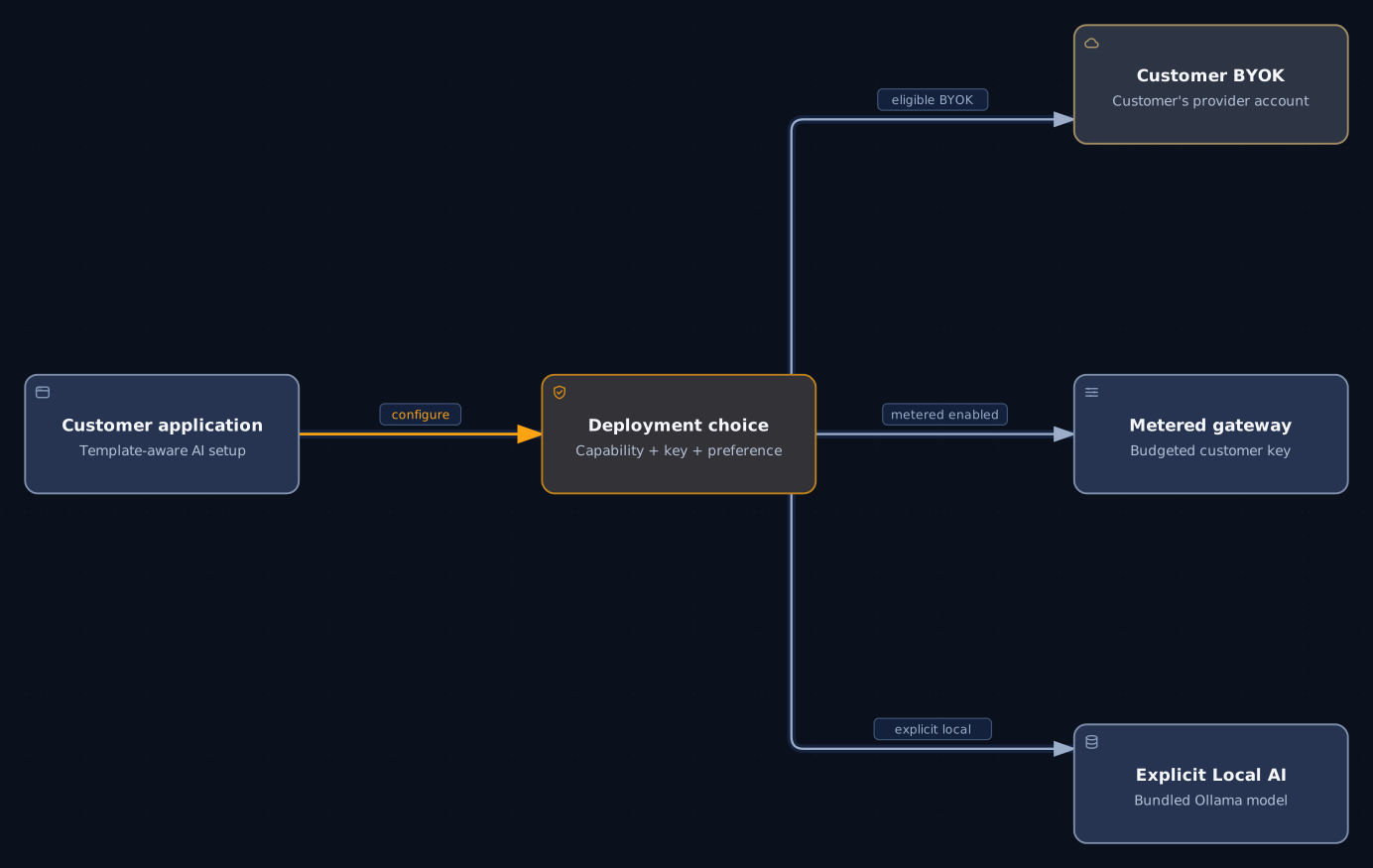
Apps built for it get their AI route when you deploy them. The customer can bring their own key and pay their provider directly. You can give them a metered key with a monthly budget. Or the app can use a local model on your server. Some other apps take an AI key in the deploy form. Others, such as Dify or LibreChat, set their AI provider inside the app.
 Open full size
Caution
Calls to an outside provider can leave your server. Local AI needs a model that is installed and working. The panel does not switch to a local model on its own. It also doesn't pass your own AI keys to customer apps.
§ 09
Four ways to put an app live
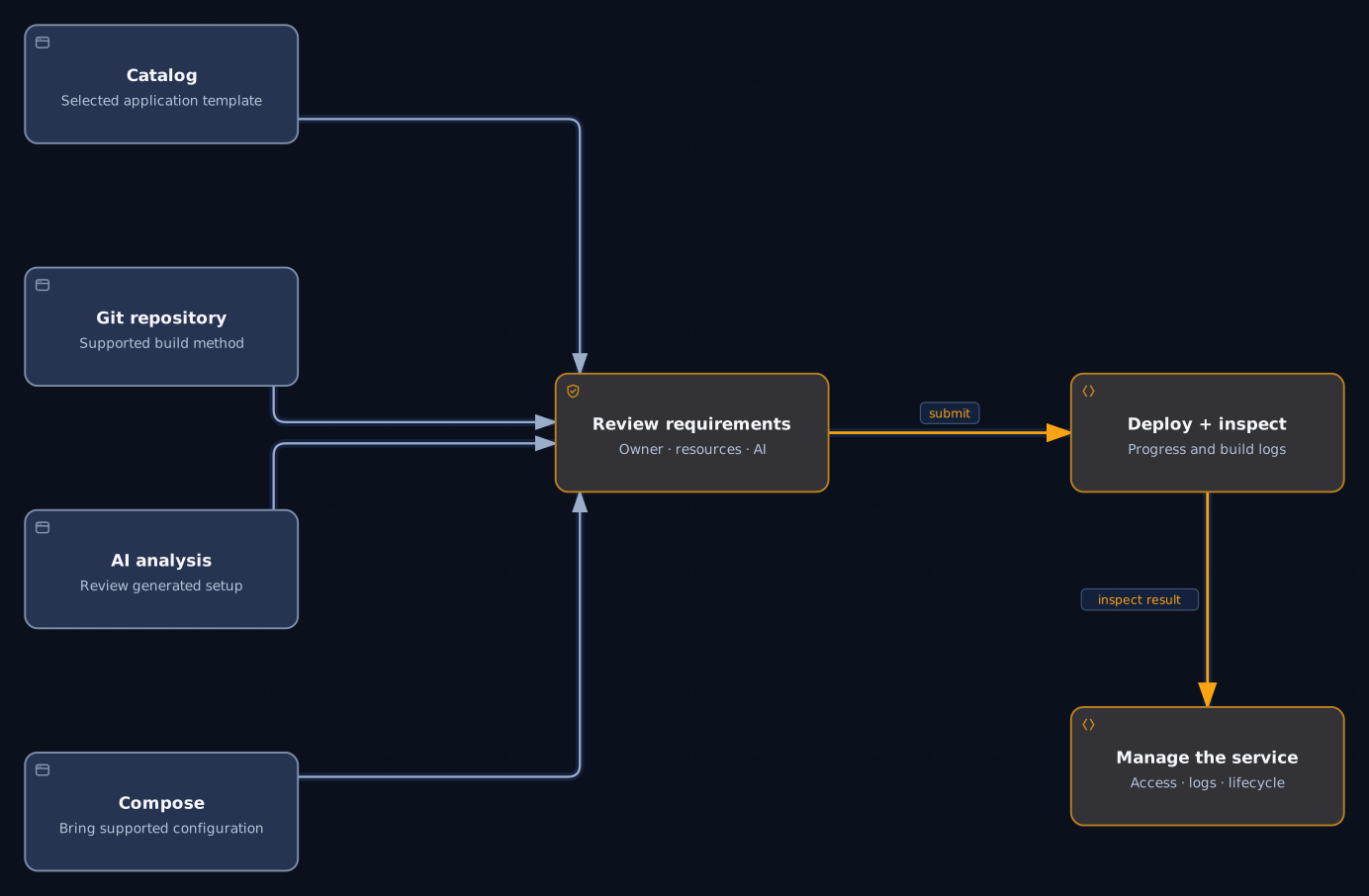
Pick an app from the catalog, deploy from Git, let AI Deploy read a repository, or bring a Docker Compose file. All four end in the same place: you check what the app needs, deploy it and see each step.
 Open full size
Note
If a deploy fails, look at its steps and use the supported retry. Some repositories need changes before they run. With AI Deploy, changes you make in the review form are not applied.
§ 10
Built for agents and for people.
Automate what you do often
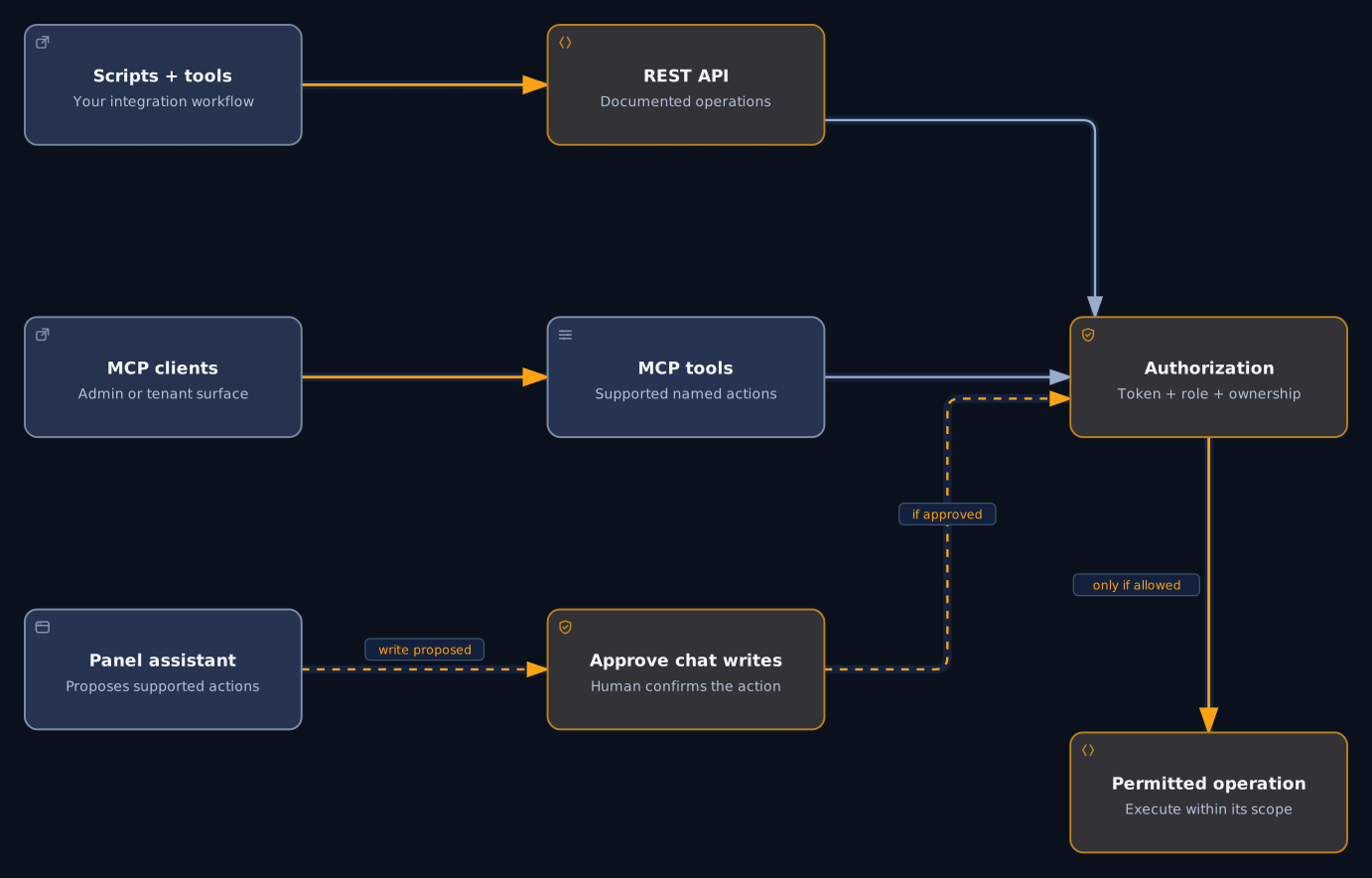
Scripts can use the REST API. AI tools can use MCP. People can ask the assistant in the panel. Every request goes through a permission check before anything happens.
 Open full size
Note
Only the assistant in the panel asks a person to approve a change. API and MCP calls go straight to the permission check. Some actions are only available in the web app.
§ 11
Your first day with it
Install it.
One command creates your administrator account. The setup wizard then asks for your edition and licence, and your AI settings.
Add a customer.
Create the account and invite their team. In the Web Host edition, you also give them a plan.
Put an app live.
From the catalog or from Git, with the AI route you choose where the app supports it.
Open a coding workspace
if your team builds apps for customers.
Keep it running.
Watch the attention list, back up supported data and install updates from the panel.
§ 12
Version 2.17.0 in numbers
- 50 catalog apps you can deploy from the panel, plus 6 hidden ones we keep out of the list.
- 262 documented operations across 212 paths in the panel's REST API. The Partner Center has its own API with 32 operations.
- 28 MCP tools for your team and 10 for customers. Some tools appear in both sets, so the two numbers don't add up to one total.
- 7 languages in the panel.
163,345 lines of maintained product and operations code, counted without blank lines, comments, tests, generated code or bundled libraries.
Note
These numbers describe what is in the release. They don't tell you how well each app runs on your setup. A short evaluation does.